Ansible in 30 Minutes
Ansible for Proxmox VE · Module 01
Learning goals
- Explain what a control node, a managed node and an inventory are
- Run ad-hoc commands against all three Proxmox VE nodes
- Describe what idempotent means and why it changes how you write things
- Read the output of an Ansible run without guessing
How Ansible works
Agentless, push-based
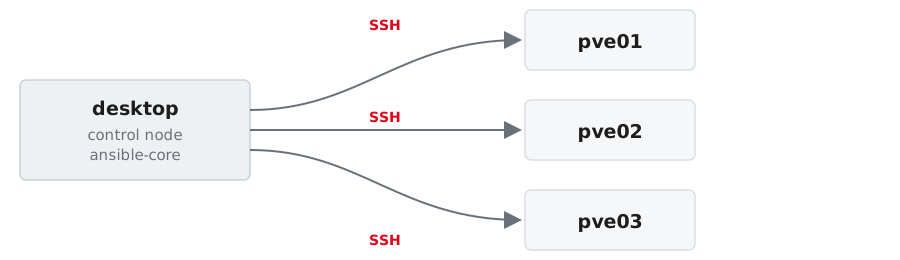
- Nothing is installed on the managed nodes. Ansible connects over SSH.
- The control node runs
ansible-core; the managed nodes only require Python. - Playbooks declare the target state, modules execute the necessary changes.
The three things you need
Inventory
Which machines
Module
What to do
Task / Playbook
The plan
Everything else (roles, handlers, variables, templates) is structure on top of these three.
Inventory: your machines, in YAML
all:
  children:
    pve:                      # group: all Proxmox VE nodes
      hosts:
        pve01: {ansible_host: 192.168.0.1}
        pve02: {ansible_host: 192.168.0.2}
        pve03: {ansible_host: 192.168.0.3}
      vars:
        ansible_user: root
    pve_primary:              # group with exactly one member
      hosts: {pve01: null}
    pve_secondary:
      hosts: {pve02: null, pve03: null}
A host may be in several groups. We will use exactly that in module 03.
Check that Ansible reads it the way you meant it:
ansible.cfg: stop typing the same flags
host_key_checking = False disables SSH host key verification. Acceptable in a throwaway lab, never in production. There you pre-seed known_hosts.
Doing something
Ad-hoc commands
One module, one run, no file:
pveis the group from the inventory (all,pve01,pve*also work)-mnames the module-apasses its arguments
Your key is on the nodes, so nothing asks for a password. Where it is not, --ask-pass asks once instead of once per task.
Useful for looking. For changing, write a playbook.
Run it from the project directory
Ansible reads ansible.cfg from the current working directory, and that file is what points at your inventory. From anywhere else:
Three warnings, no error, nothing ran. Almost always a wrong cd, not a broken inventory.
Reading the output
A module that returns data:
SUCCESS means nothing changed, CHANGED means it did. The hosts come back in whatever order they finish — ad-hoc runs them in parallel.
Reading the output
command and shell answer differently: a header line, then raw output.
And when it fails, the return code comes with it:
Four words to read
| Word | Meaning |
|---|---|
SUCCESS |
already in the desired state, nothing done |
CHANGED |
Ansible changed something |
FAILED |
the task ran and did not succeed |
UNREACHABLE |
Ansible never got to the host |
Idempotency
You describe the target state, not the steps.
- First run →
changed - Second run →
ok
A playbook that reports only ok still did its job: it checked every statement and found reality already matching.
command is the last resort
Ansible cannot know what your command does, so it reports changed even for reading a version number. You saw that in exercise 01.
Look for a module first. Nearly everything you would type on a Proxmox VE node has one, or is reachable through the API.
When there really is no module
Then the guard is yours to write:
creates:— skip the task when that path already existswhen:— a condition of your ownchanged_when:/failed_when:— decide yourself what counts
The documentation
- Start here: https://docs.ansible.com/ansible/latest/
- Playbooks: https://docs.ansible.com/ansible/latest/playbook_guide/index.html
- Ad-hoc commands: https://docs.ansible.com/ansible/latest/command_guide/intro_adhoc.html
command, with every guard listed: https://docs.ansible.com/ansible/latest/collections/ansible/builtin/command_module.html
Every module page online has the same content as ansible-doc <module> on your desktop, which is offline and matches the version you are actually running.
Exercise 01 — 10 minutes
- Read
ansible.cfgand the inventory, check it withansible-inventory --graph - Reach all three nodes
- Aim at one group, then at two hosts — predict the count before you run it
- Run the same
filecommand twice
→ Exercise sheet: Ansible in 30 minutes
credativ · Ansible for Proxmox VE