Forming the Cluster
Ansible for Proxmox VE · Module 03
Learning goals
- Install and use the
community.proxmoxcollection - Understand why Proxmox tasks run on the control node, not on the node
- Create a cluster and join two nodes, idempotently
- Keep credentials cleanly in variables (and how to handle them in production)
What we are building
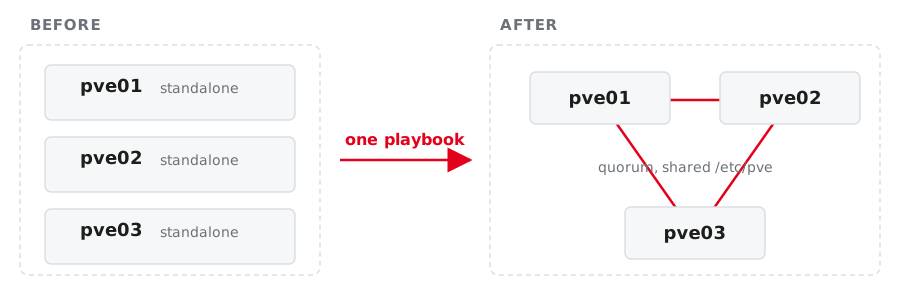
One shared configuration filesystem (/etc/pve), one GUI for all three, quorum.
Module vs. command
Raw CLI command
Works everywhere · you own the guards · parsing output is on you
We use the collection module. The CLI command path is in the handout as a fallback.
The collection
community.proxmox ships around sixty modules plus an inventory plugin.
The Proxmox modules used to live in community.general. They moved to their own collection and were removed from community.general in version 11. Old examples on the internet still say community.general.proxmox_kvm.
Where does an API module run?

- The module speaks HTTPS to the API, so it does not need to run on the node
proxmoxerandrequestsmust exist where the task runs- So: run it on the control node with
delegate_to: localhost
The play still iterates over pve02 and pve03. You keep the per-host variables and only move the execution.
Credentials: lab vs. production
In inventory/group_vars/pve.yml:
- In this lab: plain variable to keep things fast and avoid prompt fatigue
- In production: keep secrets in Ansible Vault or your CI/CD secret store
The playbook
Play 1: create the cluster
playbooks/20-cluster.yml
- name: Create the cluster on the primary node
  hosts: pve_primary
  gather_facts: false
  tasks:
    - name: Ensure the cluster exists
      community.proxmox.proxmox_cluster:
        state: present
        api_host: "{{ ansible_host }}"
        api_user: root@pam
        api_password: "{{ pve_root_password }}"
        validate_certs: false
        cluster_name: "{{ pve_cluster_name }}"
        link0: "{{ ansible_host }}"
      delegate_to: localhost
link0 pins corosync to the management network. Be explicit; do not let it guess.
Play 2: join the others, one at a time
- name: Join the remaining nodes
  hosts: pve_secondary
  gather_facts: false
  serial: 1                     # one node after the other
  vars:
    primary: "{{ groups['pve_primary'][0] }}"
  tasks:
    - name: Read the join information from the primary
      community.proxmox.proxmox_cluster_join_info:
        api_host: "{{ hostvars[primary].ansible_host }}"
        api_user: root@pam
        api_password: "{{ pve_root_password }}"
        validate_certs: false
      delegate_to: localhost
      register: join_info
Play 2: the join itself
    - name: Join this node to the cluster
      community.proxmox.proxmox_cluster:
        state: present
        api_host: "{{ ansible_host }}"
        api_user: root@pam
        api_password: "{{ pve_root_password }}"
        validate_certs: false
        master_ip: "{{ hostvars[primary].ansible_host }}"
        fingerprint: "{{ (join_info.cluster_join.nodelist
                          | selectattr('name', 'equalto', primary)
                          | first).pve_fp }}"
        link0: "{{ ansible_host }}"
      delegate_to: localhost
The fingerprint is how the joining node checks it is talking to the right cluster.
Why serial: 1 matters
Without it, all plays run in parallel and two nodes try to join the same cluster at the same moment.
- corosync has to rewrite its configuration for every new member
- the API of the joining node restarts during the join
- concurrent joins produce a cluster that is sometimes fine
serial: 1 turns a race condition into a queue. It costs a few seconds and removes a class of bug that is unpleasant to debug later.
The join is asynchronous
The API accepts the join and returns immediately. The node is not a member yet.
    - name: Wait until this node is a quorate cluster member
      community.proxmox.proxmox_cluster_status_info:
        api_host: "{{ ansible_host }}"
        api_user: root@pam
        api_password: "{{ pve_root_password }}"
        validate_certs: false
      delegate_to: localhost
      register: cl
      until: cl.cluster_status | default([])
             | selectattr('type', 'equalto', 'cluster')
             | selectattr('quorate', 'equalto', true) | list | count > 0
      retries: 30
      delay: 5
default([]) matters: the node’s API restarts during the join, and without it a single failed call aborts the loop instead of retrying.
Creating the cluster is asynchronous too
    - name: Wait until the primary reports a quorate cluster
      community.proxmox.proxmox_cluster_status_info:
        ...
      register: primary_status
      until: primary_status.cluster_status | default([])
             | selectattr('type', 'equalto', 'cluster')
             | selectattr('quorate', 'equalto', true) | list | count > 0
      retries: 30
      delay: 5
Skip this and the first join fails with cluster not ready - no quorum?. Waiting for port 8006 does not help: pveproxy never went away.
Run it
Then check, from Ansible and from the node:
Run the playbook a second time: everything ok, nothing changed.
What quorum means for you
Three nodes, three votes, quorum at 2.
| Situation | Quorate | Effect |
|---|---|---|
| 3 of 3 online | yes | normal operation |
| 2 of 3 online | yes | full operation, no redundancy left |
| 1 of 3 online | no | /etc/pve becomes read-only |
A non-quorate node cannot start guests or change configuration. That is a feature: it prevents two halves of a split cluster from both believing they are in charge.
The join rewrites /etc/pve
Root’s authorized keys are not a per-node file. They live in pmxcfs, which makes them cluster-wide.
A joining node receives the primary’s /etc/pve. Keys that existed only on that node are gone afterwards.
Your key is on all three nodes since deploy.sh, so the join changes nothing for you. On a cluster you build for someone else, it decides whether you can still log in.
Exercise 03 — 20 minutes
Install the collection, set variables in group_vars/pve.yml, write 20-cluster.yml, run it, verify.
→ Exercise sheet: Forming the cluster
credativ · Ansible for Proxmox VE