Operating the Cluster
Ansible for Proxmox VE · Module 05
Learning goals
- Stop repeating API credentials with
module_defaults - Add storage to the cluster
- Create users, roles, permissions and an API token, then use it
- Create a VM and back it up, all from the same playbook
- See what it costs to edit a config file on the node instead
The pattern is always the same
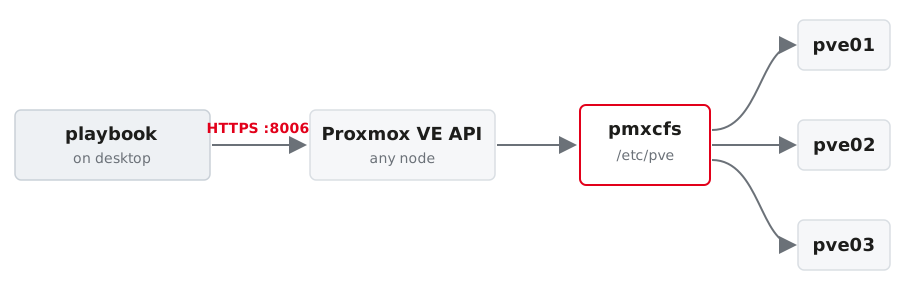
One API call, one cluster-wide change. You address any node; pmxcfs distributes the result.
Look it up: the API browser
Every node serves the full API reference, for exactly the version you are running:
- searchable tree of every endpoint, with every parameter and its type
- the public copy: https://pve.proxmox.com/pve-docs/api-viewer/
Use it when a module lacks an option. The page tells you whether the API has it at all — which decides between “file a feature request” and “use ansible.builtin.uri”.
Module option, API parameter, same name
POST /nodes/{node}/qemu in the API browser lists vmid, cores, memory, scsihw — the same names. That correspondence is what makes the browser the fastest way to find out what a guest option is actually called.
Stop repeating yourself: module_defaults
Every community.proxmox module in this play inherits those four lines.
Storage
Two halves of one job
The other half, over the API
The node is a Debian machine and a Proxmox VE node.
A second storage, a shared one
The backup directory is local to each node. An NFS library is shared, and it is where images and templates live in a real environment:
- one API call, mounted on every node under
/mnt/pve/nfs-shared contentdecides what may live there; noimages, so nothing gets allocated on it- this is where the cloud image for the next slide comes from
Users and permissions
Group, user, permission
- community.proxmox.proxmox_group:
    name: automation
    comment: Service accounts

- community.proxmox.proxmox_user:
    name: automation@pve
    groups: [automation]
    comment: Ansible service account
    enable: true

- community.proxmox.proxmox_access_acl:
    path: /
    type: group
    ugid: automation
    roleid: PVEVMAdmin
    propagate: 1
Realms matter: @pam are Linux users on the node, @pve exist only in Proxmox VE.
API tokens instead of passwords
- The secret is returned once, at creation, in
automation_user.secrets privsep: falsegives the token the user’s permissions;truerestricts it further with its own ACL
Never print a secret with debug in a shared session. Write it somewhere safe, ideally straight into an encrypted file.
Then authenticate with the token
A token can be revoked on its own, is scoped by ACL, and never unlocks an SSH session. The root password can do none of those things.
Guests
A guest from a cloud image
- community.proxmox.proxmox_kvm:
    node: "{{ pve_vm_node }}"
    vmid: "{{ pve_vm_id }}"
    name: "{{ pve_vm_name }}"
    cores: 1
    memory: 1024
    ostype: l26
    scsihw: virtio-scsi-single
    scsi:
      scsi0: "{{ pve_vm_storage }}:0,import-from={{ pve_cloud_image_path }}"
    ide:
      ide2: "{{ pve_vm_storage }}:cloudinit"
    net:
      net0: virtio,bridge=vmbr0
    boot: "order=scsi0"
    timeout: 300          # NFS import is slower than the 30 s default
state: present:0means “size taken from the source image”import-fromreads the qcow2 straight off the NFS libraryide2: …:cloudinitadds the cloud-init drive
Lazy mounts bite here
- Proxmox VE mounts an NFS storage on first activation, not when you attach it
- so importing in the same run fails with
can't find file - listing the contents activates it and confirms the image
Waiting for the path does not help: nothing has asked the node to mount it yet.
cloud-init does the rest
The guest configures its user, its SSH key and its address on first boot. No installer, no answer file, no template maintenance.
cipassword alone will not get you in: the Debian cloud image ships with PasswordAuthentication no. Set sshkeys.
From nothing to reachable in 30 seconds
Import, boot and cloud-init together take well under a minute on this lab.
Containers are one module away
The template has to be on the storage first; proxmox_template downloads it. Never hard-code the file name; ask the node which ones exist:
The other route
Sometimes you really do edit the file
Not everything has a module, and some things are simply faster to write directly. A second bridge, over SSH:
- name: Add a second bridge
  hosts: pve
  tasks:
    - name: Define vmbr1 in /etc/network/interfaces
      ansible.builtin.blockinfile:
        path: /etc/network/interfaces
        marker: "# {mark} ANSIBLE MANAGED - vmbr1"
        block: |
          auto vmbr1
          iface vmbr1 inet manual
              bridge-ports none
              bridge-stp off
              bridge-fd 0
      notify: Reload network configuration
Applying it is then your problem
ifreload -a applies the change immediately. A mistake in the file for vmbr0 takes the node off the network, including your own SSH session. Always keep a console (VDI, IPMI) available, and never touch the management interface of all three nodes in one run.
The same thing, through the API
- writes to
/etc/network/interfaces.new, the same pending state the GUI shows - becomes active on Apply Configuration, on reboot, or via
ifreload -a
Both routes end in the same file. Only one of them is idempotent and reviewable before it takes effect.
Which route when
blockinfile over SSH |
proxmox_node_network |
|
|---|---|---|
| Idempotent | you build the guard | yes |
| Visible in the GUI as pending | no, it is already in the live file | yes |
| Works without the collection | yes | no |
| Risk of locking yourself out | high | lower, but real |
Use the module when it covers your case. Reach for the file when it does not, and then go carefully: one node at a time, --limit, console at hand.
Backup
Run a backup
wait: true makes the task finish when the backup finishes, not when the API has accepted the request.
What has no module yet
Creating a scheduled backup job is not covered by a module today. proxmox_backup_schedule only adds guests to a job that already exists.
ansible.builtin.uri against the REST API works for anything. You lose idempotency, so you add the guard yourself, the same way you do with command.
Exercise 05 — 20 minutes
Storage, a service account with a token, a VM, a backup. One playbook.
→ Exercise sheet: Operating the cluster
Exercise 05 · Solutions
1 — Check the ground
pve_vm_storage: local-lvm on this lab. A ZFS install would say local-zfs, and the guest task fails late and confusingly if it is wrong.
2 — Storage, both halves
3 — The token trap
privsep: false gives the token its user’s permissions.
With privsep: true the token needs its own ACL as well, and the effective rights are the intersection of both. A token that works for one call and returns an empty list for the next is almost always this.
4 — Why the contents call comes first
Proxmox VE mounts NFS on first activation, not when you attach it. Importing in the same run fails with can't find file, and wait_for on the path does not help — nothing has asked the node to mount it yet.
5 — The run
Most tasks run on localhost: the API modules talk HTTPS and are delegated there.
Second run: localhost : ok=10 changed=1 skipped=1. The one changed is Back up the VM — a backup is an action, not a state. The skipped task writes the token secret, which the API returns only at creation.
credativ · Ansible for Proxmox VE