Ansible for Proxmox VE
credativ hands-on workshop
00 · Welcome & the Lab
Alexander Wirt & credativ
Alexander Wirt
- CTO & Co-Owner, credativ (at credativ since 2004)
- Open Source since 1998
- Debian Developer since 2003 (
formorer) - Focus: Linux infrastructure, Debian, automation & Proxmox VE
alexander.wirt@credativ.de
credativ
- Open Source consulting & support since 1999
- 24/7/365 enterprise operations & support
- Debian, PostgreSQL, Kubernetes, Ceph, Proxmox VE
- Independent, vendor-neutral engineering
The plan
| 01 | Ansible in 30 minutes — inventory, ad-hoc, idempotency | 30 |
| 02 | Your first playbook — repositories, packages, time | 30 |
| 03 | Forming the cluster — what the title promises | 40 |
| Break | 10 | |
| 04 | From playbook to role — structure that survives | 25 |
| 05 | Operating the cluster — storage, users, a guest | 45 |
| 06 | Dynamic inventory — the cluster describes itself | 10 |
| 07 | Where to go next | 5 |
What we leave out
- No general Ansible deep dive: we cover what this setup requires
- No high availability, Ceph, or complex SDN
- No production secret management in the lab (simple variables for speed)
Those are topics for dedicated follow-ups.
Your lab
| Machine | Role | Address |
|---|---|---|
desktop |
Ansible control node (your desktop) | 192.168.0.254 |
pve01 |
Proxmox VE node 1 → cluster primary | 192.168.0.1 |
pve02 |
Proxmox VE node 2 | 192.168.0.2 |
pve03 |
Proxmox VE node 3 | 192.168.0.3 |
Log in as root with the password password123 — the same on all three nodes, for SSH and for the web GUI on :8006.
Every participant has an identical, isolated set.
Set up your desktop
Everything is on the share already mounted on your desktop. Run it once:
~/ansible-proxmox— the project you work in~/ansible-venv— Ansible with the Proxmox collection, put on yourPATH~/workshop-slides— these slides- an SSH key, installed on all three nodes, so nothing asks you for a password
Then open a new terminal, or the PATH change is not in effect.
Where the sheets are
Open it once and keep the tab. Every module has a handout — the reference, with more detail than these slides — and an exercise sheet. That page links all of them, plus the cheat sheet and the bonus exercises.
Checkpoint before we start
On desktop, in a terminal:
No password and no host key question: deploy.sh handled both. If any of these fail, say so now.
If ansible --version looks wrong
Ansible runs from a virtualenv on this desktop, and it should already be on your PATH. If the version is older than 2.17, or community.proxmox is missing, you are using the system Ansible instead:
Why a virtualenv: the collection community.proxmox 2.x needs a newer proxmoxer than Debian ships, and the packaged collection is missing two modules we use.
You do not have to type everything
~/ansible-proxmox is not an empty directory:
- inventory and configuration are complete; the addresses are the same for everyone
- every playbook is a skeleton with the right task names and structure, and a
TODOwhere the content goes
Writing the files yourself works too. The exercise sheets contain everything either way.
01 · Ansible in 30 Minutes
Learning goals
- Explain what a control node, a managed node and an inventory are
- Run ad-hoc commands against all three Proxmox VE nodes
- Describe what idempotent means and why it changes how you write things
- Read the output of an Ansible run without guessing
How Ansible works
Agentless, push-based
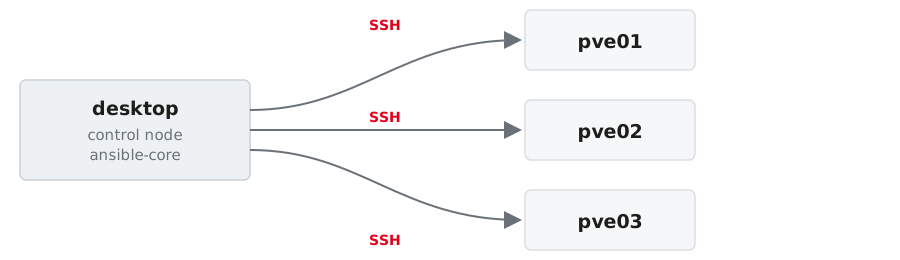
- Nothing is installed on the managed nodes. Ansible connects over SSH.
- The control node runs
ansible-core; the managed nodes only require Python. - Playbooks declare the target state, modules execute the necessary changes.
The three things you need
Inventory
Which machines
Module
What to do
Task / Playbook
The plan
Everything else (roles, handlers, variables, templates) is structure on top of these three.
Inventory: your machines, in YAML
all:
  children:
    pve:                      # group: all Proxmox VE nodes
      hosts:
        pve01: {ansible_host: 192.168.0.1}
        pve02: {ansible_host: 192.168.0.2}
        pve03: {ansible_host: 192.168.0.3}
      vars:
        ansible_user: root
    pve_primary:              # group with exactly one member
      hosts: {pve01: null}
    pve_secondary:
      hosts: {pve02: null, pve03: null}
A host may be in several groups. We will use exactly that in module 03.
Check that Ansible reads it the way you meant it:
ansible.cfg: stop typing the same flags
host_key_checking = False disables SSH host key verification. Acceptable in a throwaway lab, never in production. There you pre-seed known_hosts.
Doing something
Ad-hoc commands
One module, one run, no file:
pveis the group from the inventory (all,pve01,pve*also work)-mnames the module-apasses its arguments
Your key is on the nodes, so nothing asks for a password. Where it is not, --ask-pass asks once instead of once per task.
Useful for looking. For changing, write a playbook.
Run it from the project directory
Ansible reads ansible.cfg from the current working directory, and that file is what points at your inventory. From anywhere else:
Three warnings, no error, nothing ran. Almost always a wrong cd, not a broken inventory.
Reading the output
A module that returns data:
SUCCESS means nothing changed, CHANGED means it did. The hosts come back in whatever order they finish — ad-hoc runs them in parallel.
Reading the output
command and shell answer differently: a header line, then raw output.
And when it fails, the return code comes with it:
Four words to read
| Word | Meaning |
|---|---|
SUCCESS |
already in the desired state, nothing done |
CHANGED |
Ansible changed something |
FAILED |
the task ran and did not succeed |
UNREACHABLE |
Ansible never got to the host |
Idempotency
You describe the target state, not the steps.
- First run →
changed - Second run →
ok
A playbook that reports only ok still did its job: it checked every statement and found reality already matching.
command is the last resort
Ansible cannot know what your command does, so it reports changed even for reading a version number. You saw that in exercise 01.
Look for a module first. Nearly everything you would type on a Proxmox VE node has one, or is reachable through the API.
When there really is no module
Then the guard is yours to write:
creates:— skip the task when that path already existswhen:— a condition of your ownchanged_when:/failed_when:— decide yourself what counts
The documentation
- Start here: https://docs.ansible.com/ansible/latest/
- Playbooks: https://docs.ansible.com/ansible/latest/playbook_guide/index.html
- Ad-hoc commands: https://docs.ansible.com/ansible/latest/command_guide/intro_adhoc.html
command, with every guard listed: https://docs.ansible.com/ansible/latest/collections/ansible/builtin/command_module.html
Every module page online has the same content as ansible-doc <module> on your desktop, which is offline and matches the version you are actually running.
Exercise 01 — 10 minutes
- Read
ansible.cfgand the inventory, check it withansible-inventory --graph - Reach all three nodes
- Aim at one group, then at two hosts — predict the count before you run it
- Run the same
filecommand twice
→ Exercise sheet: Ansible in 30 minutes
Exercise 01 · Solutions
1 — Know what you are running
pve01 appears twice. Groups are labels, not folders.
2 — Reach the nodes
Three SUCCESS blocks, in whatever order the hosts finish.
Three [WARNING] lines and nothing else means you are in the wrong directory, not that the inventory is broken. Check pwd first.
3 — Aim
Quote the wildcard, or the shell gets to it first.
Patterns are not shell globs: pve0[23] matches nothing, and an empty match is not an error.
4 — Run the same thing twice
The module stats the path, finds it already right, and reports SUCCESS.
Same result on the machine, different report. This is why modules beat commands.
02 · Preparing the Nodes
Learning goals
- Write and run your first playbook
- Fix the repositories, install packages, and make the nodes resolve each other
- Use variables, facts, loops and handlers where they belong
- Try a change safely with
--check --diffbefore you mean it
Why this module exists
Before three Proxmox VE nodes can become a cluster, they need:
| Requirement | Why |
|---|---|
| Working package sources | the enterprise repo fails without a subscription |
| Name resolution for each other | corosync and pvecm resolve node names |
| Synchronised time | corosync membership is time-sensitive |
| The same base state | “it works on pve01” is not a plan |
Four requirements, four groups of tasks. That is the playbook.
Playbook structure
A play, in full
playbooks/10-node-prep.yml
---
- name: Prepare the Proxmox VE nodes
  hosts: pve              # which machines (a group from the inventory)
  gather_facts: true      # collect facts first (distribution, IPs, ...)
  tasks:

    - name: Install the admin tools we want everywhere
      ansible.builtin.apt:
        name: "{{ pve_packages }}"
        state: present
        update_cache: true
cache_valid_time: 3600name:on every task. It is what you read in the output and in the logs.- Module arguments are YAML, not a command line
Variables live in group_vars
- Applies to every host in the group
pve - Referenced as
{ pve_packages } - Change the list, re-run, done. No playbook edit.
Facts: what Ansible found out
gather_facts: true collects a few hundred variables per host before the first task:
Use them instead of hard-coding:
Your lab runs Proxmox VE 9 on Debian 13. We use the fact instead of hardcoding trixie.
The four jobs
1. Repositories
- name: Disable the enterprise repositories
  ansible.builtin.file:
    path: "{{ item }}"
    state: absent
  loop:
    - /etc/apt/sources.list.d/pve-enterprise.sources
    - /etc/apt/sources.list.d/ceph.sources
  notify: Update apt cache

- name: Enable the no-subscription repository
  ansible.builtin.deb822_repository:
    name: pve-no-subscription
    types: [deb]
    uris: http://download.proxmox.com/debian/pve
    suites: "{{ ansible_distribution_release }}"
    components: [pve-no-subscription]
    signed_by: /usr/share/keyrings/proxmox-archive-keyring.gpg
  notify: Update apt cache
Handlers: react, but only once
- A handler runs only if notified, and only once per play
- By default it runs at the end of the play
We need the cache before installing packages, so we force it:
2. Name resolution: check, do not configure
Name resolution comes from the provisioning, together with DNS and /etc/hosts. The playbook confirms it instead of rewriting it:
groups['pve']is the inventory, read at runtimedifference([inventory_hostname])drops the node itself from the loop
Why not just write /etc/hosts?
Because something else already owns it.
- Proxmox VE resolves its own node name through that file
- the provisioning sets it, together with the real domain
- a template that “helpfully” rewrites it replaces the node’s FQDN with whatever domain you invented
Automating a file that another system owns is how you break a platform quietly. Check the state you depend on; configure only what is yours.
3. Packages · 4. Time
- name: Install the admin tools
  ansible.builtin.apt:
    name: "{{ pve_packages }}"
    state: present

- name: Check whether the clock is synchronised
  ansible.builtin.command: timedatectl show -p NTPSynchronized --value
  register: ntp_state
  changed_when: false     # this only reads, so never report a change
  check_mode: false       # ... so it is safe to run it in --check too

- name: Fail early if time is not in sync
  ansible.builtin.assert:
    that: ntp_state.stdout == 'yes'
    fail_msg: "Time is not synchronised - corosync will be unhappy"
Run it
changed=0 on the second run is your proof that the playbook is idempotent. One task fewer, too: the handler only runs when something notifies it.
Flags you will use every day
--check is not perfect: a task that depends on an earlier change cannot know the future. It still catches most mistakes before they reach three nodes at once.
Exercise 02 — 15 minutes
Write playbooks/10-node-prep.yml, run it in check mode, then for real, then again.
→ Exercise sheet: Preparing the nodes
Exercise 02 · Solutions
1 — Fill in the playbook
  handlers:
    - name: Update apt cache
      ansible.builtin.apt: {update_cache: true}

    - name: Enable the no-subscription repository
      ansible.builtin.deb822_repository:
        name: pve-no-subscription
        uris: http://download.proxmox.com/debian/pve
        suites: "{{ ansible_distribution_release }}"
        components: [pve-no-subscription]
        signed_by: /usr/share/keyrings/proxmox-archive-keyring.gpg
      notify: Update apt cache
notify must match the handler name exactly. A typo does not error — the handler just never runs.
2 — See what it would do
--check skips command tasks, which would leave ntp_state undefined and fail the assert. That is what check_mode: false on the timedatectl task is for.
3 — Run it, then run it again
One task fewer. Which one?
The handler. It runs only when something notifies it.
4 — The two tasks that change nothing
changed_when: false— without itcommandreportschangedevery run, and the proof from task 3 is gonecheck_mode: false— without it--checkskips the task,ntp_stateis never registered, and the dry run fails on an undefined variable
03 · Forming the Cluster
Learning goals
- Install and use the
community.proxmoxcollection - Understand why Proxmox tasks run on the control node, not on the node
- Create a cluster and join two nodes, idempotently
- Keep credentials cleanly in variables (and how to handle them in production)
What we are building
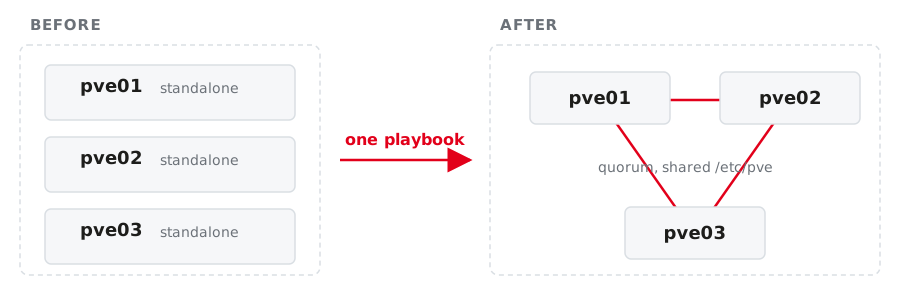
One shared configuration filesystem (/etc/pve), one GUI for all three, quorum.
Module vs. command
Raw CLI command
Works everywhere · you own the guards · parsing output is on you
We use the collection module. The CLI command path is in the handout as a fallback.
The collection
community.proxmox ships around sixty modules plus an inventory plugin.
The Proxmox modules used to live in community.general. They moved to their own collection and were removed from community.general in version 11. Old examples on the internet still say community.general.proxmox_kvm.
Where does an API module run?

- The module speaks HTTPS to the API, so it does not need to run on the node
proxmoxerandrequestsmust exist where the task runs- So: run it on the control node with
delegate_to: localhost
The play still iterates over pve02 and pve03. You keep the per-host variables and only move the execution.
Credentials: lab vs. production
In inventory/group_vars/pve.yml:
- In this lab: plain variable to keep things fast and avoid prompt fatigue
- In production: keep secrets in Ansible Vault or your CI/CD secret store
The playbook
Play 1: create the cluster
playbooks/20-cluster.yml
- name: Create the cluster on the primary node
  hosts: pve_primary
  gather_facts: false
  tasks:
    - name: Ensure the cluster exists
      community.proxmox.proxmox_cluster:
        state: present
        api_host: "{{ ansible_host }}"
        api_user: root@pam
        api_password: "{{ pve_root_password }}"
        validate_certs: false
        cluster_name: "{{ pve_cluster_name }}"
        link0: "{{ ansible_host }}"
      delegate_to: localhost
link0 pins corosync to the management network. Be explicit; do not let it guess.
Play 2: join the others, one at a time
- name: Join the remaining nodes
  hosts: pve_secondary
  gather_facts: false
  serial: 1                     # one node after the other
  vars:
    primary: "{{ groups['pve_primary'][0] }}"
  tasks:
    - name: Read the join information from the primary
      community.proxmox.proxmox_cluster_join_info:
        api_host: "{{ hostvars[primary].ansible_host }}"
        api_user: root@pam
        api_password: "{{ pve_root_password }}"
        validate_certs: false
      delegate_to: localhost
      register: join_info
Play 2: the join itself
    - name: Join this node to the cluster
      community.proxmox.proxmox_cluster:
        state: present
        api_host: "{{ ansible_host }}"
        api_user: root@pam
        api_password: "{{ pve_root_password }}"
        validate_certs: false
        master_ip: "{{ hostvars[primary].ansible_host }}"
        fingerprint: "{{ (join_info.cluster_join.nodelist
                          | selectattr('name', 'equalto', primary)
                          | first).pve_fp }}"
        link0: "{{ ansible_host }}"
      delegate_to: localhost
The fingerprint is how the joining node checks it is talking to the right cluster.
Why serial: 1 matters
Without it, all plays run in parallel and two nodes try to join the same cluster at the same moment.
- corosync has to rewrite its configuration for every new member
- the API of the joining node restarts during the join
- concurrent joins produce a cluster that is sometimes fine
serial: 1 turns a race condition into a queue. It costs a few seconds and removes a class of bug that is unpleasant to debug later.
The join is asynchronous
The API accepts the join and returns immediately. The node is not a member yet.
    - name: Wait until this node is a quorate cluster member
      community.proxmox.proxmox_cluster_status_info:
        api_host: "{{ ansible_host }}"
        api_user: root@pam
        api_password: "{{ pve_root_password }}"
        validate_certs: false
      delegate_to: localhost
      register: cl
      until: cl.cluster_status | default([])
             | selectattr('type', 'equalto', 'cluster')
             | selectattr('quorate', 'equalto', true) | list | count > 0
      retries: 30
      delay: 5
default([]) matters: the node’s API restarts during the join, and without it a single failed call aborts the loop instead of retrying.
Creating the cluster is asynchronous too
    - name: Wait until the primary reports a quorate cluster
      community.proxmox.proxmox_cluster_status_info:
        ...
      register: primary_status
      until: primary_status.cluster_status | default([])
             | selectattr('type', 'equalto', 'cluster')
             | selectattr('quorate', 'equalto', true) | list | count > 0
      retries: 30
      delay: 5
Skip this and the first join fails with cluster not ready - no quorum?. Waiting for port 8006 does not help: pveproxy never went away.
Run it
Then check, from Ansible and from the node:
Run the playbook a second time: everything ok, nothing changed.
What quorum means for you
Three nodes, three votes, quorum at 2.
| Situation | Quorate | Effect |
|---|---|---|
| 3 of 3 online | yes | normal operation |
| 2 of 3 online | yes | full operation, no redundancy left |
| 1 of 3 online | no | /etc/pve becomes read-only |
A non-quorate node cannot start guests or change configuration. That is a feature: it prevents two halves of a split cluster from both believing they are in charge.
The join rewrites /etc/pve
Root’s authorized keys are not a per-node file. They live in pmxcfs, which makes them cluster-wide.
A joining node receives the primary’s /etc/pve. Keys that existed only on that node are gone afterwards.
Your key is on all three nodes since deploy.sh, so the join changes nothing for you. On a cluster you build for someone else, it decides whether you can still log in.
Exercise 03 — 20 minutes
Install the collection, set variables in group_vars/pve.yml, write 20-cluster.yml, run it, verify.
→ Exercise sheet: Forming the cluster
Exercise 03 · Solutions
1 — The password
The collection is already there — deploy.sh installed it offline.
2 — The two waits
- name: Wait until the primary reports a quorate cluster
  community.proxmox.proxmox_cluster_status_info:
  register: primary_status
  until: primary_status.cluster_status | default([])
         | selectattr('type', 'equalto', 'cluster')
         | selectattr('quorate', 'equalto', true) | list | count > 0
  retries: 30
  delay: 5
  delegate_to: localhost
default([]) is not decoration: the node’s API restarts during the join, and without it one failed call aborts the loop instead of retrying.
3 — The run
pve01 has two tasks, the others three. No --check: a dry run creates no cluster, so the join play has nothing to read.
4 — Proving it
The same three directories on every node — pmxcfs replicating. Second playbook run: changed=0 everywhere.
04 · From Playbook to Role
Learning goals
- Know what a role is and when to use one
- Move
10-node-prep.ymlinto a role without changing its behaviour - Put values in
defaults/, logic intasks/, files intemplates/ - Understand enough about variable precedence to stay out of trouble
The problem roles solve
Your 10-node-prep.yml is 60 lines. It will not stay that way.
- The same tasks are needed in the next project
- Values and logic are mixed in one file
- Two people editing one playbook produce one merge conflict
A role is a directory layout with conventions, nothing more.
The layout
roles/pve_node/
├── defaults/main.yml     # values, lowest precedence - meant to be overridden
├── vars/main.yml         # values that are NOT meant to be overridden
├── tasks/main.yml        # the tasks (no "hosts:", no "- name: play")
├── handlers/main.yml     # the handlers
├── templates/            # Jinja2 templates (.j2)
├── files/                # files copied verbatim
└── meta/main.yml         # dependencies, metadata
Ansible loads main.yml from each of these automatically. You do not wire anything up yourself.
Before and after
defaults/ is the role’s interface
roles/pve_node/defaults/main.yml
Anyone using your role can override any of these. That is the contract.
vars/main.yml is the opposite: values the role needs and callers should not touch. Use it sparingly, because it outranks almost everything.
Variable precedence, the short version
From weakest to strongest, the parts you will actually meet:
roles/x/defaults/main.ymlinventory/group_vars/inventory/host_vars/roles/x/vars/main.ymlvars:in the play--extra-varson the command line
The working rule: put values in defaults/, override them in group_vars/. That covers almost every case.
Templates
A template renders a file from inventory data and facts. The classic first one is a message of the day:
The template itself
templates/motd.j2
The logic leaves the YAML. Diffs become readable, and the template can be inspected on its own.
template owns the whole file
That is the difference to lineinfile or blockinfile, which own a marked region.
blockinfile |
template |
|
|---|---|---|
| Owns | a marked region | the whole file |
| Foreign changes | survive | are overwritten |
| Use when | the file has other owners | the file is yours alone |
/etc/motd is yours. /etc/hosts is not — the provisioning writes it, and Proxmox VE resolves its own node name through it. Pick the file before you pick the module.
Tags belong to the role, too
A tagged partial run can leave a host in a state that no full run would produce. Tags are for fast iteration while developing, not a substitute for structure.
One more habit: ansible-lint
It catches the things reviewers would otherwise catch for you: missing name:, shell where command suffices, deprecated syntax, unsafe file permissions.
Exercise 04 — 10 minutes
Convert 10-node-prep.yml into the role pve_node and prove that nothing changed: the first run after the conversion must report changed=0.
→ Exercise sheet: From playbook to role
Exercise 04 · Solutions
1 — The defaults
Uncomment roles/pve_node/defaults/main.yml, then delete pve_packages from inventory/group_vars/pve.yml.
Leave it in group_vars and group_vars keeps outranking the role default — the interface is then decorative.
2 — Scope, the trap
Correct behaviour, not a broken refactoring: role defaults are in scope only while the role runs.
3 — The proof
The one changed is /etc/motd — the flat playbook never wrote it. Everything else was already in the state the role describes.
05 · Operating the Cluster
Learning goals
- Stop repeating API credentials with
module_defaults - Add storage to the cluster
- Create users, roles, permissions and an API token, then use it
- Create a VM and back it up, all from the same playbook
- See what it costs to edit a config file on the node instead
The pattern is always the same
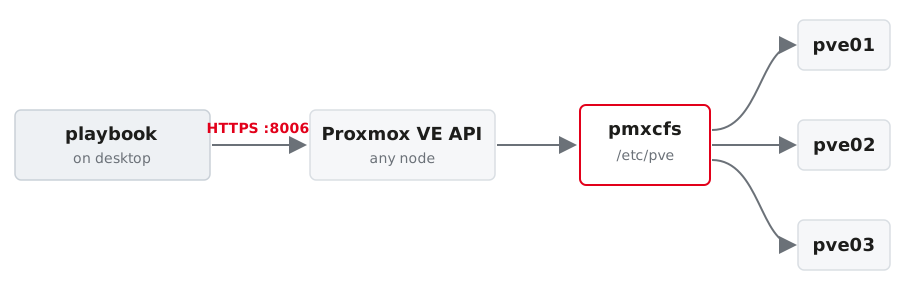
One API call, one cluster-wide change. You address any node; pmxcfs distributes the result.
Look it up: the API browser
Every node serves the full API reference, for exactly the version you are running:
- searchable tree of every endpoint, with every parameter and its type
- the public copy: https://pve.proxmox.com/pve-docs/api-viewer/
Use it when a module lacks an option. The page tells you whether the API has it at all — which decides between “file a feature request” and “use ansible.builtin.uri”.
Module option, API parameter, same name
POST /nodes/{node}/qemu in the API browser lists vmid, cores, memory, scsihw — the same names. That correspondence is what makes the browser the fastest way to find out what a guest option is actually called.
Stop repeating yourself: module_defaults
Every community.proxmox module in this play inherits those four lines.
Storage
Two halves of one job
The other half, over the API
The node is a Debian machine and a Proxmox VE node.
A second storage, a shared one
The backup directory is local to each node. An NFS library is shared, and it is where images and templates live in a real environment:
- one API call, mounted on every node under
/mnt/pve/nfs-shared contentdecides what may live there; noimages, so nothing gets allocated on it- this is where the cloud image for the next slide comes from
Users and permissions
Group, user, permission
- community.proxmox.proxmox_group:
    name: automation
    comment: Service accounts

- community.proxmox.proxmox_user:
    name: automation@pve
    groups: [automation]
    comment: Ansible service account
    enable: true

- community.proxmox.proxmox_access_acl:
    path: /
    type: group
    ugid: automation
    roleid: PVEVMAdmin
    propagate: 1
Realms matter: @pam are Linux users on the node, @pve exist only in Proxmox VE.
API tokens instead of passwords
- The secret is returned once, at creation, in
automation_user.secrets privsep: falsegives the token the user’s permissions;truerestricts it further with its own ACL
Never print a secret with debug in a shared session. Write it somewhere safe, ideally straight into an encrypted file.
Then authenticate with the token
A token can be revoked on its own, is scoped by ACL, and never unlocks an SSH session. The root password can do none of those things.
Guests
A guest from a cloud image
- community.proxmox.proxmox_kvm:
    node: "{{ pve_vm_node }}"
    vmid: "{{ pve_vm_id }}"
    name: "{{ pve_vm_name }}"
    cores: 1
    memory: 1024
    ostype: l26
    scsihw: virtio-scsi-single
    scsi:
      scsi0: "{{ pve_vm_storage }}:0,import-from={{ pve_cloud_image_path }}"
    ide:
      ide2: "{{ pve_vm_storage }}:cloudinit"
    net:
      net0: virtio,bridge=vmbr0
    boot: "order=scsi0"
    timeout: 300          # NFS import is slower than the 30 s default
state: present:0means “size taken from the source image”import-fromreads the qcow2 straight off the NFS libraryide2: …:cloudinitadds the cloud-init drive
Lazy mounts bite here
- Proxmox VE mounts an NFS storage on first activation, not when you attach it
- so importing in the same run fails with
can't find file - listing the contents activates it and confirms the image
Waiting for the path does not help: nothing has asked the node to mount it yet.
cloud-init does the rest
The guest configures its user, its SSH key and its address on first boot. No installer, no answer file, no template maintenance.
cipassword alone will not get you in: the Debian cloud image ships with PasswordAuthentication no. Set sshkeys.
From nothing to reachable in 30 seconds
Import, boot and cloud-init together take well under a minute on this lab.
Containers are one module away
The template has to be on the storage first; proxmox_template downloads it. Never hard-code the file name; ask the node which ones exist:
The other route
Sometimes you really do edit the file
Not everything has a module, and some things are simply faster to write directly. A second bridge, over SSH:
- name: Add a second bridge
  hosts: pve
  tasks:
    - name: Define vmbr1 in /etc/network/interfaces
      ansible.builtin.blockinfile:
        path: /etc/network/interfaces
        marker: "# {mark} ANSIBLE MANAGED - vmbr1"
        block: |
          auto vmbr1
          iface vmbr1 inet manual
              bridge-ports none
              bridge-stp off
              bridge-fd 0
      notify: Reload network configuration
Applying it is then your problem
ifreload -a applies the change immediately. A mistake in the file for vmbr0 takes the node off the network, including your own SSH session. Always keep a console (VDI, IPMI) available, and never touch the management interface of all three nodes in one run.
The same thing, through the API
- writes to
/etc/network/interfaces.new, the same pending state the GUI shows - becomes active on Apply Configuration, on reboot, or via
ifreload -a
Both routes end in the same file. Only one of them is idempotent and reviewable before it takes effect.
Which route when
blockinfile over SSH |
proxmox_node_network |
|
|---|---|---|
| Idempotent | you build the guard | yes |
| Visible in the GUI as pending | no, it is already in the live file | yes |
| Works without the collection | yes | no |
| Risk of locking yourself out | high | lower, but real |
Use the module when it covers your case. Reach for the file when it does not, and then go carefully: one node at a time, --limit, console at hand.
Backup
Run a backup
wait: true makes the task finish when the backup finishes, not when the API has accepted the request.
What has no module yet
Creating a scheduled backup job is not covered by a module today. proxmox_backup_schedule only adds guests to a job that already exists.
ansible.builtin.uri against the REST API works for anything. You lose idempotency, so you add the guard yourself, the same way you do with command.
Exercise 05 — 20 minutes
Storage, a service account with a token, a VM, a backup. One playbook.
→ Exercise sheet: Operating the cluster
Exercise 05 · Solutions
1 — Check the ground
pve_vm_storage: local-lvm on this lab. A ZFS install would say local-zfs, and the guest task fails late and confusingly if it is wrong.
2 — Storage, both halves
3 — The token trap
privsep: false gives the token its user’s permissions.
With privsep: true the token needs its own ACL as well, and the effective rights are the intersection of both. A token that works for one call and returns an empty list for the next is almost always this.
4 — Why the contents call comes first
Proxmox VE mounts NFS on first activation, not when you attach it. Importing in the same run fails with can't find file, and wait_for on the path does not help — nothing has asked the node to mount it yet.
5 — The run
Most tasks run on localhost: the API modules talk HTTPS and are delegated there.
Second run: localhost : ok=10 changed=1 skipped=1. The one changed is Back up the VM — a backup is an action, not a state. The skipped task writes the token secret, which the API returns only at creation.
06 · Dynamic Inventory
Learning goals
- Understand why a static inventory goes stale
- Configure the
community.proxmox.proxmoxinventory plugin - Read the groups and facts it generates
- Build your own groups from Proxmox tags
The problem
- Someone creates a VM in the GUI → it is not in your inventory
- Someone deletes one → your playbook fails on a host that no longer exists
- Someone renames one → you find out at the worst possible moment
The cluster already knows all of this. Ask it.
The plugin
inventory/lab.proxmox.yml
The file name must end in .proxmox.yml or .proxmox.yaml. Otherwise the plugin politely ignores it and you debug an empty inventory.
What you get
Groups per node, per type, per status, per pool. Generated, never maintained.
Facts, if you ask for them
With want_facts: true every guest carries its Proxmox configuration:
Tags become groups
Tag a guest in Proxmox VE, group on it in Ansible:
The person creating the VM decides its role, in the GUI, with a tag, and your playbooks follow.
Static and dynamic together
Or set both in ansible.cfg:
The nodes stay static, because they have to exist before anything is dynamic. The guests come from the cluster.
Exercise 06 — 8 minutes
Configure the plugin, list the inventory, find your VM from module 05, tag it and build a group from the tag.
→ Exercise sheet: Dynamic inventory
Exercise 06 · Solutions
1 — The token
A 401 means the token does not match this cluster. Usually the secret was never exported, or module 05 ran somewhere else.
2 — What the cluster answers
Nobody typed any of that into an inventory file.
3 — The silent failure
The file name must end in .proxmox.yml. Otherwise the plugin ignores it, and you get an empty inventory with no error.
ansible-inventory -vvv shows the “Skipping due to inventory source not ending in …” line. Worth showing once — it is the one failure here that looks like nothing at all.
07 · Where to Go Next
What you built in 3.5 hours
~/ansible-proxmox/
├── ansible.cfg
├── requirements.yml
├── site.yml
├── inventory/
│   ├── hosts.yml              # the three nodes
│   ├── lab.proxmox.yml        # everything else, from the API
│   └── group_vars/
├── playbooks/
│   ├── 20-cluster.yml         # forms the cluster
│   └── 30-operations.yml            # storage, users, guests, backup
└── roles/pve_node/ # the reusable partSummary
- Describe the target state, do not script the steps
changed=0is a test result. It confirms reality matches the definition.- Keep playbooks and roles focused: separate base node setup from cluster orchestration
- A module beats a command; when you must use a command, add the guard yourself
- Least privilege: a scoped API token, not the root password
What we did not cover
| Topic | Where it belongs |
|---|---|
| Ceph, HA, SDN, QDevice | Proxmox VE Clustering & Shared Storage |
| Cloud-init images, golden templates | a VM lifecycle workshop |
| AWX / Ansible Automation Platform, Semaphore | an Ansible operations workshop |
| Molecule, CI for roles | an Ansible testing workshop |
| Ansible for the guests inside the VMs | a general Ansible course |
The obvious next step
Your playbooks currently run from your laptop. That works exactly as long as it is only you.
- Git first: the repository is the source of truth, not a directory
- CI second: run
ansible-lintand--checkon every merge request - AWX / AAP or Semaphore third: scheduled runs, an audit trail, credentials that live somewhere other than a developer’s home directory
In that order.
Still curious?
The bonus exercises go further than the workshop had time for:
- make the backup task idempotent
- scope the API token to a resource pool
- build a scheduled backup job with
ansible.builtin.uri - turn the guest into a template and clone from it
- let Proxmox tags drive a play
- write a read-only health check playbook
Solutions included. They assume the state you have right now.
Where to look things up
- Ansible: https://docs.ansible.com/ansible/latest/
- The collection: https://docs.ansible.com/ansible/latest/collections/community/proxmox/
- Proxmox VE: https://pve.proxmox.com/pve-docs/
- The API of your own cluster:
https://<node>:8006/pve-docs/api-viewer/ - Offline, always correct for your version:
ansible-doc <module>
Bookmark the third and the fifth. Those are the two you will actually use.
Thank you
Questions, discussion, and code:
- All slides, handouts, labs, and reference code in
code/are yours to keep - credativ GmbH · https://www.credativ.de
credativ · Ansible for Proxmox VE