Ansible in 30 Minutes
Ansible for Proxmox VE · Module 01
Learning goals
- Explain what a control node, a managed node and an inventory are
- Run ad-hoc commands against all three Proxmox VE nodes
- Describe what idempotent means and why it changes how you write things
- Read the output of an Ansible run without guessing
How Ansible works
Agentless, push-based
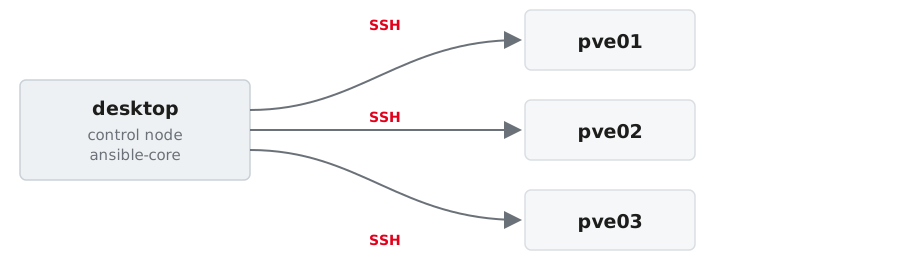
- Nothing is installed on the managed nodes. Ansible connects over SSH.
- The control node runs
ansible-core; the managed nodes only require Python. - Playbooks declare the target state, modules execute the necessary changes.
The three things you need
Inventory
Which machines
Module
What to do
Task / Playbook
The plan
Everything else (roles, handlers, variables, templates) is structure on top of these three.
Inventory: your machines, in YAML
all:
  children:
    pve:                      # group: all Proxmox VE nodes
      hosts:
        pve01: {ansible_host: 192.168.0.1}
        pve02: {ansible_host: 192.168.0.2}
        pve03: {ansible_host: 192.168.0.3}
      vars:
        ansible_user: root
    pve_primary:              # group with exactly one member
      hosts: {pve01: null}
    pve_secondary:
      hosts: {pve02: null, pve03: null}
A host may be in several groups. We will use exactly that in module 03.
Check that Ansible reads it the way you meant it:
ansible.cfg: stop typing the same flags
host_key_checking = False disables SSH host key verification. Acceptable in a throwaway lab, never in production. There you pre-seed known_hosts.
Doing something
Ad-hoc commands
One module, one run, no file:
pveis the group from the inventory (all,pve01,pve*also work)-mnames the module-apasses its arguments
Your key is on the nodes, so nothing asks for a password. Where it is not, --ask-pass asks once instead of once per task.
Useful for looking. For changing, write a playbook.
Run it from the project directory
Ansible reads ansible.cfg from the current working directory, and that file is what points at your inventory. From anywhere else:
Three warnings, no error, nothing ran. Almost always a wrong cd, not a broken inventory.
Reading the output
A module that returns data:
SUCCESS means nothing changed, CHANGED means it did. The hosts come back in whatever order they finish — ad-hoc runs them in parallel.
Reading the output
command and shell answer differently: a header line, then raw output.
And when it fails, the return code comes with it:
Four words to read
| Word | Meaning |
|---|---|
SUCCESS |
already in the desired state, nothing done |
CHANGED |
Ansible changed something |
FAILED |
the task ran and did not succeed |
UNREACHABLE |
Ansible never got to the host |
Idempotency
You describe the target state, not the steps.
- First run →
changed - Second run →
ok
A playbook that reports only ok still did its job: it checked every statement and found reality already matching.
command is the last resort
Ansible cannot know what your command does, so it reports changed even for reading a version number. You saw that in exercise 01.
Look for a module first. Nearly everything you would type on a Proxmox VE node has one, or is reachable through the API.
When there really is no module
Then the guard is yours to write:
creates:— skip the task when that path already existswhen:— a condition of your ownchanged_when:/failed_when:— decide yourself what counts
The documentation
- Start here: https://docs.ansible.com/ansible/latest/
- Playbooks: https://docs.ansible.com/ansible/latest/playbook_guide/index.html
- Ad-hoc commands: https://docs.ansible.com/ansible/latest/command_guide/intro_adhoc.html
command, with every guard listed: https://docs.ansible.com/ansible/latest/collections/ansible/builtin/command_module.html
Every module page online has the same content as ansible-doc <module> on your desktop, which is offline and matches the version you are actually running.
Exercise 01 — 10 minutes
- Read
ansible.cfgand the inventory, check it withansible-inventory --graph - Reach all three nodes
- Aim at one group, then at two hosts — predict the count before you run it
- Run the same
filecommand twice
→ Exercise sheet: Ansible in 30 minutes
Exercise 01 · Solutions
1 — Know what you are running
pve01 appears twice. Groups are labels, not folders.
2 — Reach the nodes
Three SUCCESS blocks, in whatever order the hosts finish.
Three [WARNING] lines and nothing else means you are in the wrong directory, not that the inventory is broken. Check pwd first.
3 — Aim
Quote the wildcard, or the shell gets to it first.
Patterns are not shell globs: pve0[23] matches nothing, and an empty match is not an error.
4 — Run the same thing twice
The module stats the path, finds it already right, and reports SUCCESS.
Same result on the machine, different report. This is why modules beat commands.
credativ · Ansible for Proxmox VE